Digital Paper Design Seamless Pattern: What You Really Need to Know Before Downloading
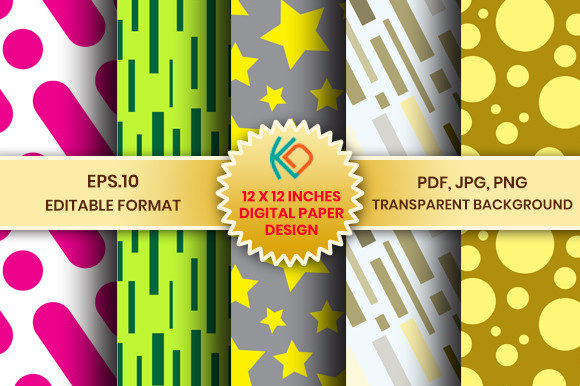
If you've searched for “digital paper pack” or “modern scrapbook paper,” you’ve likely seen terms like seamless pattern, vector graphics, and 300 dpi print-ready—but not all digital papers deliver what they promise. The Digital Paper Design Seamless Pattern collection stands out because it’s built with real-world use in mind—not just aesthetics. It’s a curated set of 5 versatile, high-resolution designs (with matching pink and blue tones), plus an expanded 30-paper navy and coral variant—each file carefully prepared for both digital creativity and professional printing.
Why “Seamless” Isn’t Just a Buzzword—It’s a Functional Requirement
A true seamless pattern repeats without visible edges or misaligned tiles. Many designers assume any repeating background qualifies—but that’s where problems start. Poorly constructed patterns show telltale seams when tiled across large surfaces (like wall decals, fabric mockups, or full-page invitations). Worse, some “seamless” JPGs are merely cropped squares with no actual tiling logic. This leads to frustrating hours spent manually editing or repositioning elements in Photoshop or Canva.
The Digital Paper Design Seamless Pattern files avoid this entirely. Each design is mathematically aligned and tested for infinite tiling—whether you’re building a website background in Figma, creating a printable planner in Adobe InDesign, or designing custom wrapping paper. That’s why the EPS 10 vector files matter: they scale infinitely without pixelation, and the PDFs retain crisp text overlays and spot-color accuracy for print shops.
Don’t Overlook File Types—Your Use Case Dictates Which Format You Actually Need
It’s tempting to grab only the JPGs—they’re familiar and open anywhere. But that’s often the first misstep. JPGs lack transparency, so layering them over photos or colored backgrounds requires extra masking work. PNGs solve that—but only if they’re truly 3600 × 3600 px *with alpha channels*, not just renamed JPGs. This pack includes properly exported PNGs with transparent backgrounds, letting you drop patterns directly onto layered projects in Procreate, Illustrator, or even PowerPoint—no background erasing needed.
Meanwhile, EPS 10 files aren’t just for “pro users.” They’re essential if you plan to recolor elements (e.g., changing a coral motif to sage green for a wedding suite) or adjust spacing without quality loss. And unlike raster files, EPS lets you isolate individual pattern motifs—useful for turning part of a background into a standalone icon or border.
Resolution Confusion: Why “300 dpi” Alone Doesn’t Guarantee Print Success
You’ll see “300 dpi” everywhere—but resolution only tells half the story. A 300 dpi image at 1200 × 1200 px prints poorly at 12″ × 12″ (it would be ~4″ × 4″ at true 300 dpi). This pack correctly delivers 3600 × 3600 px JPGs and PNGs—exactly what’s needed for sharp, bleed-free 12″ × 12″ prints. That’s non-negotiable for scrapbookers using physical printers or services like Staples or Mpix.
Here’s a practical check before downloading any digital paper: Does the listing specify both dimensions (in pixels) AND physical size at 300 dpi? If not, ask—or look elsewhere. Vague claims like “high-res” or “print-quality” without concrete numbers often mean upscaled or low-DPI originals.
Commercial Use Clarity—Avoid Surprises Down the Road
Many free or low-cost digital papers claim “commercial use” but bury restrictive clauses: “up to 500 units,” “no resale of digital files,” or “no use in POD templates.” The Digital Paper Design Seamless Pattern pack explicitly permits small commercial use—including business cards, letterhead, Etsy listings, and client-facing collateral—without hidden caps or attribution requirements. That matters whether you’re a freelance designer building brand kits or a small shop owner creating party invites.
Still, always verify the license scope *before* integrating into a product you’ll sell. For example, using a pattern as the sole visual element in a Canva template you resell may violate some licenses—even if “small commercial use” is allowed. When in doubt, stick to derivative uses: layering the pattern behind original illustrations, combining it with your own photography, or embedding it in multi-element layouts.
What to Check in the Zip Folder Before You Start Designing
- File naming consistency: Are JPGs, PNGs, PDFs, and EPS files named identically (e.g., “PinkGeometric_01.jpg”, “PinkGeometric_01.png”)? Mismatched names waste time hunting for variants.
- Color mode: RGB is fine for web; CMYK is better for offset printing. This pack uses RGB—ideal for most home and online printers—and includes PDF/X-1a compatibility for professional print prep.
- Transparency test: Open one PNG in a program with a dark background (like Preview on Mac or Paint.NET). If you see white edges or halos, the transparency wasn’t exported cleanly. These files pass that test.
- Vector integrity: Open an EPS in Illustrator and try ungrouping. If motifs remain editable (not flattened into one shape), you can modify stroke weights, colors, or spacing—giving you far more flexibility than static JPGs ever could.
Real Projects, Real Results
A blogger designing a Pinterest-optimized ebook cover used the navy and coral papers to build a cohesive color-blocked layout—then swapped one pattern for a lighter tone using the EPS file’s recolor tool. No new downloads. No mismatched hues.
A small stationery brand printed 200 wedding invitation suites on textured cardstock. Because the JPGs were truly 3600 × 3600 px at 300 dpi—and the PDFs included embedded fonts and crop marks—the printer returned zero complaints about blurriness or alignment issues.
That’s the quiet value of thoughtful digital paper design: it removes friction, not just decoration.
Final Thought: Choose for Workflow, Not Just Aesthetics
Great digital paper isn’t defined by how pretty it looks in a thumbnail—it’s defined by how smoothly it moves through your process. Does it tile without manual fixes? Does it scale for a 24″ banner *and* render cleanly on a mobile email header? Can you tweak it without starting over? The Digital Paper Design Seamless Pattern answers yes—to all three. Before adding another pack to your cart, ask: Which file types will I actually use this week? Which ones will save me time next month? That’s how you turn digital paper from decoration into a working asset.